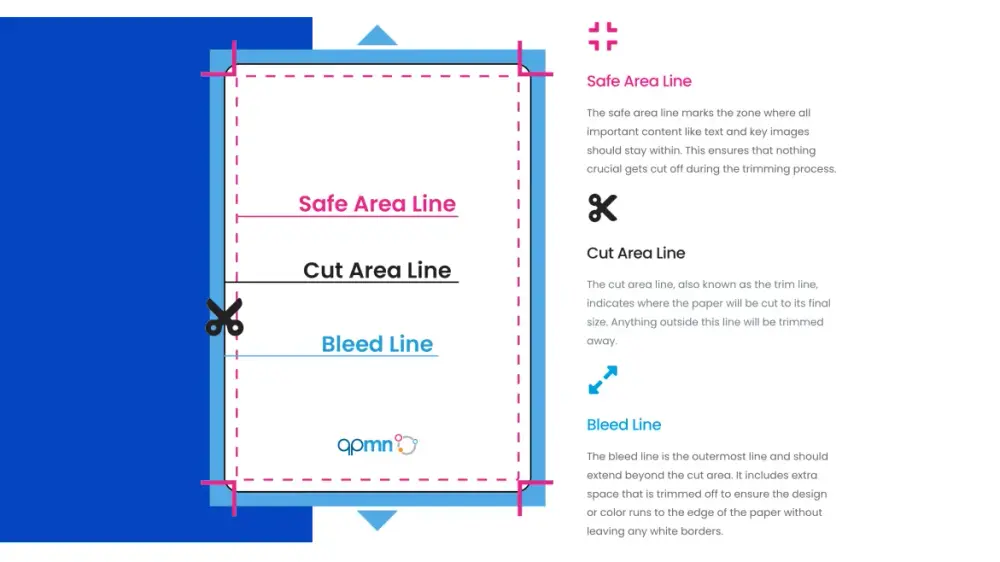

TLDR
Trim size (final card): 2.5" x 3.5" (aka “poker size”).
Bleed (extra art past the cut): add 1/8" on every side, so your file is 2.75" x 3.75".
Safe zone (keep important text inside): stay 1/8" away from the trim edge.
Most “mystery white edges” are just no bleed plus slightly imperfect cutting. Reality remains undefeated.
If you’re searching “MTG card size, bleed, and safe zone,” you’re probably trying to print proxies that don’t come out looking like you trimmed them with your teeth. Fair.
The good news: the spec is simple. The bad news: ignoring it creates the exact problems you’re trying to fix.
The three zones that matter
1) Trim size (final card)
This is the finished card after cutting.
Trim: 2.5" x 3.5" (about 63 x 88 mm)
2) Bleed (extra art that gets cut off)
Bleed is the “planned sacrifice” area. You extend backgrounds and art past the final card edge so a slightly-off cut still looks clean.
Standard bleed: 1/8" (0.125") on every side
File size with bleed: 2.75" x 3.75"
If your art stops exactly at the trim edge, the cutter has one job: expose a skinny white sliver somewhere. And it will perform that job with enthusiasm.
3) Safe zone (where important stuff lives)
Safe zone is the opposite of bleed. It’s the “don’t put text here” zone near the edges.
Safe zone rule: keep key elements at least 1/8" inside the trim line
That includes rules text, mana symbols, set symbols, and thin border lines.
Pixel cheat sheet (so you don’t do math while tired)
Assuming 1/8" bleed and 1/8" safe margin, here are the common working sizes:
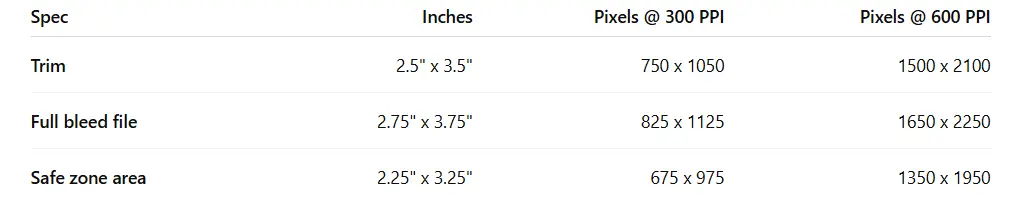
Printer templates sometimes vary by a hair (metric rounding is a thing), so if you’re using a vendor template, follow their guides first.
“Scaling” is the silent assassin
Even with perfect art, your print settings can ruin you.
In your print dialog, look for anything like:
“Fit to page”
“Scale to fit”
“Shrink to printable area”
Turn it off. Print at:
100%
Actual size
No scaling
If your software prints at 97% to “help,” it’s not helping. It’s inventing borders you didn’t design.
The fastest way to sanity-check your file
Put a real card on your monitor (yes, physically).
Zoom your design to 100% and compare size.
Do a single test print on plain paper.
Cut one card and sleeve it.
If the physical size is off, fix that before you chase color or DPI.
Practical template workflow
Start with a template that already shows trim, bleed, and safe guides.
Build your design so backgrounds extend to bleed.
Keep text comfortably inside the safe zone.
Export a print-friendly PDF when possible.
If you want a broader “from file to finished card” walkthrough, these pair well:
FAQs
What’s the standard MTG card size?
2.5" x 3.5" is the standard target size for MTG-sized cards.
How much bleed should I use for MTG proxies?
Most print workflows use 1/8" (0.125") bleed on each side. Always check your printer’s template if provided.
What pixel size do I need for 300 DPI proxies?
At 300 PPI, trim size is 750 x 1050 px. With 1/8" bleed, use 825 x 1125 px.
Do I still need a safe zone on borderless cards?
Yes. “Borderless” doesn’t mean “safe to put text on the edge.” Cuts drift. Keep text inside.
What if my printer template uses metric measurements?
That’s normal. Use the template’s guides. The goal is the same: bleed outside, safe inside.