
TLDR
Duplexing in printing usually means printing on both sides of a sheet instead of only one side.
Automatic duplexing means the printer flips the sheet internally. Manual duplexing means you flip and reload the paper yourself, like a tiny unpaid print shop employee.
In commercial finishing, duplexing can also mean bonding two or more sheets together to create thicker cardstock.
For MTG proxies, duplexing matters because card fronts, backs, thickness, alignment, coating, and cutting all affect how the cards look and feel in sleeves.
The printer setting is only part of the job. Good MTG proxy printing also needs the right stock, registration, finish, and clean trimming.
Printer terminology has a special talent for sounding simple right until it ruins your afternoon. Duplexing in printing is one of those terms. Most of the time, it just means printing on both sides of a sheet. Easy enough.
But because printing likes to be a little cursed, “duplexing” can also mean something different in commercial cardstock production: bonding sheets together to make a thicker, layered stock. That distinction matters if you are printing MTG proxies, custom tokens, playtest cards, or anything that needs to shuffle like a real card instead of a laminated restaurant menu from 2008.
What Duplexing In Printing Means
In everyday printer language, duplexing means two-sided printing. A duplex printer can print on the front and back of a sheet. A simplex printer prints on only one side.
That is the basic glossary version:
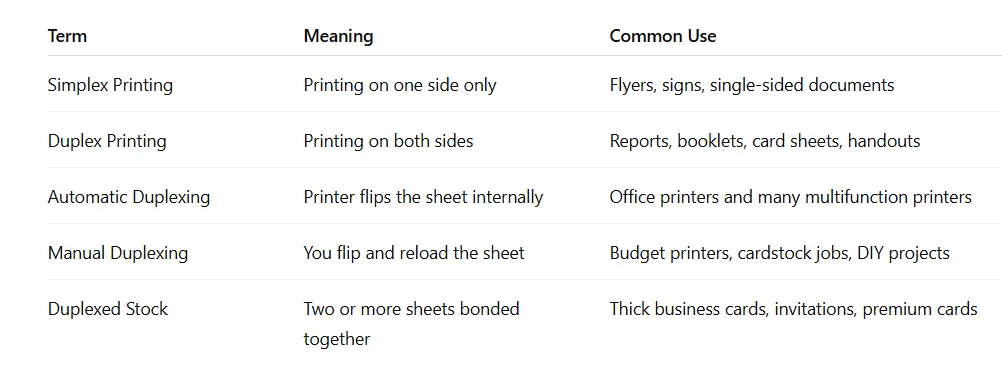
For normal documents, duplexing is mostly about saving paper and keeping reports from becoming sad little bricks. For MTG cards and proxies, the stakes are different. You are not just asking, “Can the printer put ink on both sides?” You are asking, “Will the front and back line up, will the card feel right, and will it survive being shuffled by someone who treats sleeves like farm equipment?”
Different question. Different pain.
Automatic Duplexing Vs Manual Duplexing
Automatic duplexing is the version most people mean when they say a printer “has duplex.” The printer prints one side, pulls the sheet back through, flips it internally, and prints the other side.
Manual duplexing is the more hands-on version. The printer prints one side, pauses, and asks you to reload the sheets so it can print the backs. This is fine for a few pages. For a full Commander deck, it becomes a bonding exercise between you and your paper tray.
Automatic Duplexing
Automatic duplexing is best for:
Office documents
Reports
Manuals
Light or standard paper
Jobs where tiny alignment shifts are not a big deal
The upside is convenience. The downside is that many automatic duplex units are designed around ordinary paper, not thick card stock. Some printers handle heavier stock well. Others react to cardstock like you fed them a tortilla.
Manual Duplexing
Manual duplexing is best for:
Printers without automatic duplexing
Small test batches
Thicker paper that should not be forced through a duplexer
DIY projects where you want more control
The upside is control. The downside is human error. Reload the stack the wrong way and suddenly every card back is upside down. Congratulations, you have invented the Reverse Uno Secret Lair.
Long Edge Vs Short Edge: The Setting That Betrays People
Most duplex settings include two options:
Flip on long edge
Flip on short edge
For normal portrait documents, long-edge flipping usually behaves like a book. You turn the page from the side, and the back reads correctly.
Short-edge flipping behaves more like a calendar. You flip upward, and the back is oriented differently.
For MTG proxy sheets, there is no universal answer that works for every layout, printer, and PDF orientation. The correct setting is the one that makes your card backs face the right direction after printing and cutting.
Here is the practical rule: print one test sheet before printing the whole batch. Not one deck. Not one cube. One sheet. Let one sheet die nobly so the rest may live.
Why Duplexing Gets Tricky For MTG Proxies
Two-sided printing sounds easy until you remember that MTG cards are small, rectangular, and extremely good at making tiny mistakes obvious.
A full sheet of cards might look fine at first glance, but once you cut it down into individual 2.5 x 3.5 inch cards, small front-to-back shifts become more visible. A card back that is off by a millimeter may not matter for a casual token, but a tight border or centered graphic can make the shift look much worse.
For MTG proxy cards, duplexing affects:
Front-to-back registration: Whether the front and back line up.
Orientation: Whether the backs are upside down.
Thickness: Whether the cards feel consistent in a sleeve.
Curl: Whether ink, coating, or paper tension bends the sheet.
Cut tolerance: Whether the final trim hides or exposes alignment issues.
Shuffle feel: Whether the deck handles like cards or like tiny posters.
That is why good proxy printing is not just “turn on duplex mode and pray to the paper gods.” Duplex mode gets ink onto both sides. It does not automatically solve stock, coating, cutting, or alignment.
Duplex Printing Vs Duplexed Cardstock
This is the part that causes confusion.
In office printing, duplexing means printing both sides of a sheet.
In commercial print finishing, duplexing can mean bonding two sheets of paper or cardstock together to create a thicker final piece. If three sheets are bonded together, that is often called triplexing.
This matters for cards because MTG cards are not just basic cardstock with ink on both sides. They are layered playing cards with a core, printed faces, and a finish. If you are trying to create proxy cards that feel good in sleeves, the physical construction matters as much as the image.
That does not mean every casual proxy needs elaborate layered stock. For kitchen table testing, a clean front in an opaque sleeve with a backing card can work perfectly well. But if you want a polished proxy deck that shuffles consistently, cardstock choice becomes a real decision. PrintMTG has a deeper breakdown of thickness and stock terms in its guide to PT, GSM, and LB for MTG proxy printing.
Good, Better, Best: Duplexing For MTG Proxy Cards
Here is the practical framework.
Good: Single-Sided Proxy Fronts In Opaque Sleeves
This is the easiest route for testing.
Print the card fronts, cut them cleanly, and sleeve each proxy in front of a basic land or bulk card. Use opaque sleeves so the back does not matter.
Best for:
Testing deck upgrades
Casual Commander
Temporary playtest cards
Quick iteration
Tradeoff: The unsleeved card does not feel like a finished card, and the backing card adds bulk. But for testing whether your new “brilliant” Commander tech is actually playable, it works.
Better: Manual Duplexing On Suitable Cardstock
Print fronts, reload the sheets carefully, and print backs. Use a forgiving back design with bleed and avoid tight borders that make tiny shifts obvious.
Best for:
Custom tokens
Casual proxy sets
Small batches
Players who like tinkering
Tradeoff: Alignment takes testing. Your printer may also dislike thicker stock, because apparently paper thickness is where it draws the line.
Best: Professional Two-Sided Card Printing And Finishing
Professional proxy printing controls the whole chain: file prep, image quality, front and back printing, coating, cutting, and cornering. That matters because a card can look great and still feel off if it is cut poorly or finished inconsistently.
PrintMTG’s production process is built around that full-card experience. The goal is not just “ink on cardstock.” The goal is cards that read clearly, stack evenly, sleeve cleanly, and shuffle smoothly. You can see more about the workflow on PrintMTG’s page about how we print MTG proxies.
Tradeoff: You give up some DIY control, but you also avoid spending your evening negotiating with a paper tray. A fair exchange, honestly.
Common Duplexing Problems And How To Avoid Them
The Back Is Upside Down
Cause: Wrong flip setting or sheet orientation.
Fix: Print a one-sheet test and mark the top edge of the paper before running the second side. Use that test to confirm long-edge or short-edge flipping.
The Front And Back Do Not Line Up
Cause: Paper movement during feeding, manual reload variation, or printer registration limits.
Fix: Use bleed, avoid tight borders, and keep important back artwork away from the trim edge. Designs with forgiving backgrounds handle tiny shifts better.
The Printer Jams On Cardstock
Cause: The paper is too thick, curled, textured, or unsupported for that duplex path.
Fix: Check your printer’s paper weight limits. If the automatic duplexer struggles, try manual duplexing or switch to a professional card printer.
The Cards Curl
Cause: Ink coverage, moisture, heat, coating, or uneven tension between sides.
Fix: Use compatible stock, let prints dry fully, avoid oversaturating one side, and keep finish consistent. Heavy ink on one side and light ink on the other can make paper behave badly, because paper has opinions.
The Deck Feels Inconsistent
Cause: Mixed paper weights, uneven trimming, different sleeves, or mismatched finish.
Fix: Use one stock, one finish, one sleeve type, and one cutting method across the whole deck.
The MTG Proxy Bottom Line
Duplexing in printing is simple in theory: print both sides of the sheet. For regular documents, that is usually enough.
For MTG proxy cards, duplexing is only one piece of the puzzle. You also need the right cardstock thickness, good front-to-back alignment, clean cutting, smooth finish, and consistent card feel. Otherwise, your proxies may look fine in a photo and still handle like a stack of tiny cereal boxes.
If you are making quick playtest cards, do not overcomplicate it. Single-sided fronts in opaque sleeves are fine. If you want polished cards for repeated casual play, pay attention to the full production process, not just the duplex setting.
The printer checkbox is not magic. It is just a checkbox. Classic printer behavior, really.
FAQs
What Is Duplexing In Printing?
Duplexing in printing usually means printing on both sides of a sheet of paper or cardstock. It is also called two-sided printing or double-sided printing.
What Is The Difference Between Duplex And Simplex Printing?
Simplex printing prints on one side only. Duplex printing prints on both sides. Simplex is useful for signs, labels, and one-sided sheets. Duplex is useful for reports, booklets, cards, and other pieces where both sides matter.
Is Duplexing The Same As Double-Sided Printing?
In office printing, yes. Duplexing and double-sided printing usually mean the same thing. In commercial finishing, duplexing can also mean bonding two or more sheets together to make thicker stock.
Should I Use Automatic Duplexing For MTG Proxies?
Usually only if your printer supports the cardstock you are using. Many automatic duplexers are built for standard paper, not thick card stock. If the paper is heavy, manual duplexing or professional printing is often safer.
Why Do My Double-Sided Prints Not Line Up Perfectly?
Small alignment shifts can happen when paper moves through the printer, when sheets are reloaded manually, or when the paper is cut. Use bleed, safe margins, and forgiving back designs to make small shifts less noticeable.
What Is Duplexed Cardstock?
Duplexed cardstock is made by bonding two sheets together to create a thicker final stock. It is common in premium business cards, invitations, and other pieces where thickness and feel matter.