
TLDR
PDF is usually best for printing, especially for full sheets and decks.
PNG is great for single-card images because it’s lossless.
JPG is the usual culprit when text gets crunchy, because it’s lossy.
Sharp printing comes from the source quality plus how you export, not from vibes.
If you’re comparing PDF vs PNG vs JPG for MTG proxies, you’re really asking: “Which format keeps my text and art crisp when printed?”
Here’s the straight answer: PDF wins most print workflows, PNG is the clean runner-up, and JPG is fine only when handled carefully.
The core differences (in human terms)
A PDF can contain:
vector text and shapes (stays sharp),
raster images (depends on resolution),
embedded fonts (prevents font substitution chaos),
multiple pages and consistent sizing.
PDF is a container, not a promise. A PDF full of low-res images is still low-res. But a properly built PDF is the most print-friendly way to keep layout and scaling consistent.
PNG
PNG is a lossless raster format. That’s excellent for:
crisp edges,
clean type if the type is rasterized at high resolution,
avoiding compression artifacts.
Downside: big files, and it’s not ideal for multi-page “whole deck” printing unless you like managing hundreds of files.
JPG (JPEG)
JPG uses lossy compression, which is why file sizes are small. That’s also why fine details can get mushy:
text edges,
mana symbols,
thin lines,
high-contrast borders.
If you only have JPGs, use the highest quality export and avoid re-saving repeatedly.
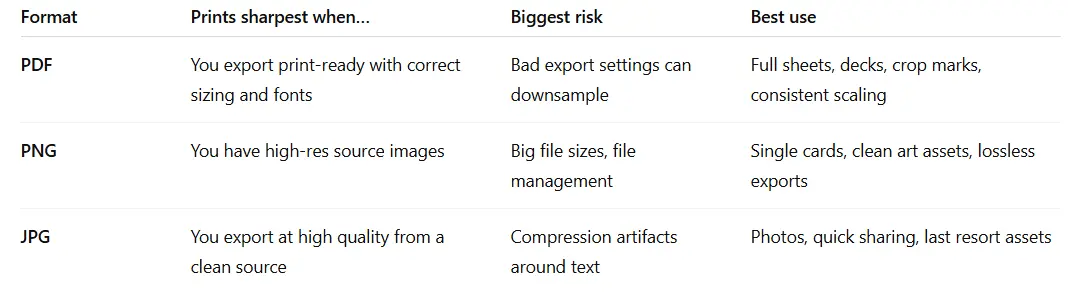
Quick comparison table
What we recommend for most proxy printing workflows
If you’re printing a whole deck
Make a single multi-card PDF:
9-up or 8-up layout per page
fixed sizing
print at 100%
This reduces two common failures:
accidental scaling,
printing the wrong file version.
If you want the “how to build the sheet” flow, start here:
If you’re exporting individual cards
Use PNG when possible:
it preserves detail cleanly,
it won’t invent compression mess.
Then only convert to PDF at the final layout stage if needed.
If you’re stuck with JPGs
You can still get decent prints if:
the source image is actually high resolution,
you don’t over-compress,
you don’t repeatedly re-save.
But if your rules text already looks soft on screen at 100%, JPG will not save you.
PDF export settings that matter (without turning into a prepress goblin)
Keep images at 300 PPI at final print size for cards.
Avoid “smallest file size” export presets.
Embed fonts when text is present.
PDF/X standards exist to reduce common print errors, but you don’t need to become a PDF priest to print a proxy deck. Just don’t export a “web PDF” and expect miracles.
What about file DPI? - read our guide here.
FAQs
Is PDF always better than PNG?
For printing a whole deck, yes, because sizing and layout are stable. For single-card assets, PNG is often cleaner.
Why does my JPG look sharp on screen but bad in print?
Screen viewing hides a lot. Print exposes compression artifacts, especially around text and thin lines.
Do I need PDF/X?
Not always. It can help in professional printing contexts, but the basics (correct size, correct resolution, no downsampling) matter more.
Can PrintMTG accept PNGs?
For many print workflows, a clean PDF is the simplest. If you’re ordering printed proxies, a single print-ready file is easiest to handle and least likely to get scaled accidentally.
What’s the single biggest format mistake?
Exporting a PDF with aggressive downsampling because “the file was big.” Yes. Print files are often big. That’s normal.