
TLDR
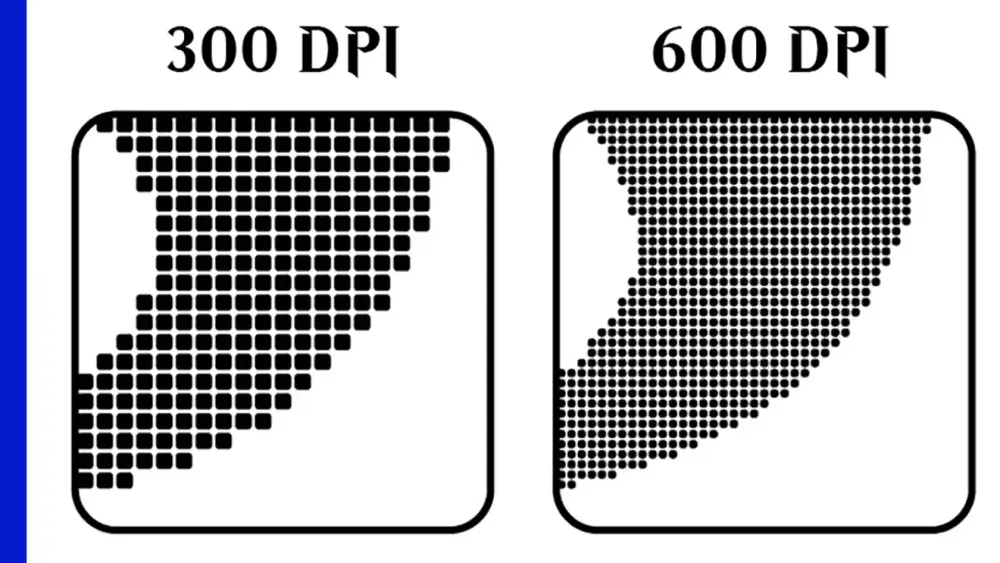
300 PPI at final card size is the standard baseline for crisp proxy printing.
600 PPI helps only if your source is truly high-res. Upscaling doesn’t add detail.
For MTG size, 300 PPI = 750 x 1050 px at trim.
If your text is fuzzy, the cause is usually source quality or scaling, not “you didn’t pick 600.”
If you’re debating 300 DPI vs 600 DPI for MTG proxies, you’re already doing more math than most people do before mulligan decisions. Respect.
But let’s make it simple.
The big key limitation is OFTEN how high of resolution is a printer capable of. At PrintMTG our printers are capable of 1200dpi, but most consumer grade printers are only capable of 300dpi at most.
First: DPI vs PPI (the quick sanity fix)
Technically:
PPI = pixels per inch (your image resolution)
DPI = dots per inch (printer output)
Most people say DPI when they mean PPI. In this article, when we say “300 DPI,” we mean “300 PPI at the final printed size,” because that’s the part you control.
What 300 looks like for MTG card size
Trim size is 2.5" x 3.5".
So:
300 PPI: 2.5 x 300 = 750 px, 3.5 x 300 = 1050 px
600 PPI: 1500 x 2100 px
If your file is smaller than 750 x 1050 for a full card, it’s below 300 PPI at size.
When 600 actually helps
600 PPI is useful when:
your source art is genuinely high resolution,
you have fine linework or tiny type,
you’re downsampling carefully (600 to 300) to reduce aliasing.
600 does not help when:
your source image is low-res and you upscale it,
you export with heavy compression,
you print with “draft” settings anyway.
Upscaling is not detail recovery. It’s just bigger blur.
A practical “Good / Better / Overkill” framework
Good (most proxy printing)
300 PPI at final size
clean PDF export
no scaling in print dialog
Better (if you have great assets)
build at 450 to 600 PPI
export without downsampling
or downsample once at the end with quality settings
Overkill (for MTG-sized cards)
above 600 PPI for typical proxy printing
you’ll mostly get bigger files and slower handling
Why 300 is the default in printing
A lot of print workflows target 300 PPI for photos and general imagery because it’s enough detail for typical viewing distance and press reproduction.
Some prepress guides ask for higher resolution for line art (think 1200 PPI for pure black-and-white bitmap art), but proxy cards are a mixed-content case: art + text + symbols. A clean 300 PPI file at final size is usually the best baseline.
The “one test” rule
Before you print 100 cards:
Print one sheet on plain paper.
Cut one card.
Sleeve it.
Read the rules text from normal table distance.
If it reads cleanly there, you’re done. If it’s fuzzy, fix the file source or scaling before you jump from 300 to 600 and call it “troubleshooting.”
For more print workflow context:
FAQs
Is 600 DPI always better than 300 DPI?
Only if the source art is actually high-res and your workflow preserves that detail. Otherwise, it’s just larger files.
What resolution do I need for sharp text on proxies?
If your text is rasterized, start at 300 PPI at final size minimum. Vector text inside a PDF can be even sharper.
Why do some guides say 1200 DPI?
That’s often for pure line art or bitmap elements. It’s not a requirement for full-color card art.
Can I fix low-res images by converting to 600 DPI?
No. Changing the DPI metadata without increasing pixel dimensions doesn’t add detail.
What’s the fastest way to check if my file is high enough quality?
Check pixel dimensions. For MTG trim at 300 PPI, you want 750 x 1050 px or higher.
https://www.pdfpc.com/doc/PDF_5_Pre-Press-Requirements.pdf
https://www.adobe.com/uk/creativecloud/photography/discover/dots-per-inch-dpi-resolution.html