
TLDR
Screens show RGB light. Printers lay down ink. Some color shift is normal, even when you “did everything right.”
At PrintMTG, we prefer RGB files. Our expanded-gamut presses use more than CMYK, so we can often hold vibrancy closer to what you see on screen.
The real question is who controls the conversion. If you convert to a random CMYK profile first, you can throw away color information before it ever hits our workflow.
For proxies, chase consistency and readability, not holy perfection. Your deck does not need museum-grade color management.
Do one small test print (or small order) before you go full 100-card masterpiece. Your monitor is lying politely.
If you’re googling “RGB vs CMYK for MTG proxy printing,” you’re probably staring at a proxy that came out dull, too dark, or a little “why is my blue suddenly sad?”
That’s not a personal failure. That’s physics, plus color conversion, plus paper, plus the harsh truth that your screen is basically a tiny sun and your printed card is not.
RGB vs CMYK in one minute
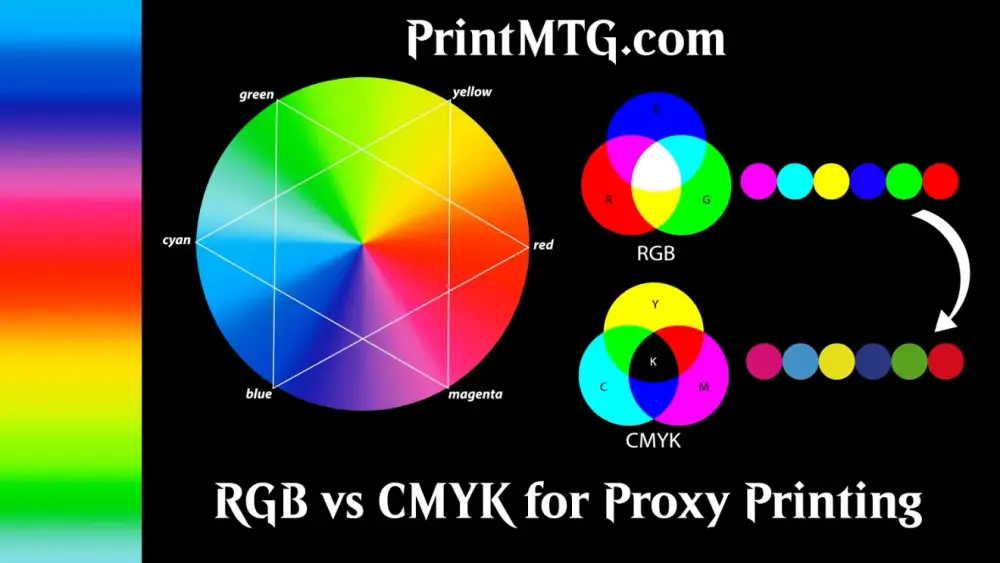
RGB (Red, Green, Blue) is how screens make color using light. Add more light, it gets brighter.
CMYK (Cyan, Magenta, Yellow, Key/Black) is how traditional printing makes color using ink. Add more ink, it usually gets darker (and at some point, muddy).
That means two important things:
Some punchy RGB colors just do not exist in a standard CMYK world.
Even when the color can be reproduced, it depends on who does the conversion and what the printer can actually reproduce.
The part everyone skips: who converts your file
You have three real-world options:
Option 1: You convert to CMYK
Pros: More control (if you know the exact target profile).
Cons: Easy to pick the wrong profile and “bake in” a bad conversion forever.
Option 2: Your print service converts it
Pros: Often the best choice when the printer has a managed workflow and known profiles.
Cons: You need to trust the service and follow their file-prep rules.
Option 3: Your software converts it “helpfully” without telling you
Pros: Comedy.
Cons: Surprise color shifts, especially in shadows and saturated colors, plus the kind of confusion that makes you question your life choices.
For MTG proxies, you generally want Option 1 or Option 2. Option 3 is where joy goes to die.
Why PrintMTG prefers RGB files
A lot of print shops default to “send CMYK” because their workflow is built around conventional four-color process, and they’d rather you own the conversion.
We’re different on purpose. At PrintMTG, we prefer RGB because our presses run expanded gamut (more than CMYK). In plain English: we have a bigger box of crayons than “just CMYK,” and that lets us reproduce a wider range of colors more consistently than a basic 4-color process.
Here’s why that matters for proxy printing:
If you convert to CMYK too early, you can clip colors. Once a vivid green gets squished into a smaller CMYK gamut, it does not magically re-expand later.
Keeping files in RGB preserves more intent. We can then map your RGB colors into our press profile in a controlled way, rather than inheriting a random conversion you did to a profile that may not match our equipment.
Expanded gamut helps where Magic art actually lives. Saturated blues, greens, certain purples, and “glowy” fantasy gradients tend to be the first victims of basic CMYK.
Important honesty clause: RGB is not a guarantee of perfect screen-matching. Paper, coating, and lighting still matter. But for our workflow, RGB gives us the best starting point to get you “looks great in sleeve, at the table” color.

So should you ever convert to CMYK yourself?
Sometimes, yes. Just not by default.
Convert to CMYK yourself if:
A printer specifically provides a target CMYK profile and tells you to convert to it.
You’re matching a previous CMYK print run and need to be consistent with that exact look.
You’re experienced with color management and you want full responsibility for the final conversion.
Otherwise, for PrintMTG orders, stay RGB and let us handle conversion into our expanded-gamut workflow.
A simple workflow that works (especially for PrintMTG)
If you’re sending files to PrintMTG
Do this:
Keep your file RGB
Use sRGB unless you have a strong reason not to
Embed the color profile when you export
Export to a high-quality PDF when possible (or a high-res PNG for single cards)
Avoid this:
Converting to CMYK “because printing”
Exporting JPGs with aggressive compression (crunchy text is forever)
Stripping profiles (untagged color is basically “good luck, everyone”)
If you’re printing at home
Home printing is its own ecosystem of chaos.
Stay in RGB (sRGB is usually safest)
Let the printer driver manage conversion
Turn off “auto enhance” or “vivid photo” modes if they blow out saturation or crush shadows
Print one test sheet first, then adjust
Good / Better / Best: file prep for proxy color
Good: “I want it to look solid in sleeves”
RGB file in sRGB
300 DPI (or better) at final size
PNG for single cards
Minimal filters, no heavy sharpening
Better: “I care about crisp edges and consistent sizing”
RGB PDF
Embedded color profile
Fonts embedded (or text rasterized at high resolution if needed)
No downsampling on export
Best: “I’m a responsible adult and I fear reprints”
RGB PDF with consistent export settings across the whole deck
Embedded profile + embedded fonts
A quick test print or a small first batch before you order the full deck
You keep a “final print-ready” version you can reuse without re-exporting differently next time
You do not need to become a color scientist. You just need a repeatable process.
Why your prints look darker than your screen (and how to stop panicking)
This one gets everyone.
Screens emit light. Prints reflect light.
Most monitors are set brighter than real life because humans enjoy glowing rectangles.
Dark midtones and shadows are where conversions get dramatic, fast.
Practical fix: If your prints come out too dark, reduce monitor brightness and test again, or adjust your file slightly brighter before printing. You are not “making it wrong.” You are compensating for how prints are viewed in the real world.
“My blacks look washed”
Read our guide on printing blacks.
RGB black is “no light.” Printed black is “ink on paper.”
Depending on conversion, paper, and finish, blacks can look:
Washed (thin ink density or paper showing through)
Muddy (too much ink build, especially in shadows)
Fine (the boring outcome we all secretly want)
We’ll go deeper in the dedicated “black therapy session” article, but for now: if your design uses near-black backgrounds behind text, expect readability to suffer. Proxies win when rules text stays clean.
Common mistakes that cause surprise color shifts
Double conversion
You convert to CMYK, then the workflow converts again. Now you have a conversion of a conversion. It’s like photocopying a photocopy.No embedded profile
If your file is untagged, software has to guess what your colors mean. Guessing is not a workflow.Using your monitor profile
Monitor profiles are for display calibration, not portable file color.Over-compressed JPG exports
Text and mana symbols do not forgive compression artifacts. They just become crunchy and stay crunchy.Expecting neon
Some colors are out of gamut for ink on paper, even with expanded gamut. We can get closer than basic CMYK, but “glowing laser lime” is still hard.
A sane way to test color for a full proxy deck
Before you print 100 cards:
Print or order a small sample (even 5 to 10 cards)
Check them in sleeves
View them under the lighting you actually play under
If something’s off, adjust once, then re-test
Color consistency matters more than absolute accuracy in a Commander deck. Your table is not judging you on Delta E. They are judging you on whether they can read your card from across the battlefield.
FAQs
Should I send CMYK files to PrintMTG?
If you already have CMYK files, we can print them. But we prefer RGB because our expanded-gamut workflow can often hold vibrancy and balance better when we control conversion.
What RGB profile should I use?
sRGB is the safest default for consistency across apps and export paths. If you work in a wider-gamut space (like Adobe RGB), make sure you embed the profile so colors do not drift.
Will RGB guarantee the print matches my screen?
No, because your screen is backlit and your card is not. But RGB gives us a better starting point, and expanded gamut helps us get closer to the look you intended.
Why do some colors shift more than others?
Highly saturated colors and certain blues/greens tend to be the first to shift because they are the most likely to land outside a smaller print gamut.
How do I get the most consistent reprints later?
Use the same export settings every time (same profile, same file format, same resolution). Consistency beats constant tinkering.
Are proxies tournament legal if the color is perfect?
No. Proxy legality is about event rules, not print quality. If it’s sanctioned, assume you need authentic cards unless the organizer tells you otherwise.