
TLDR
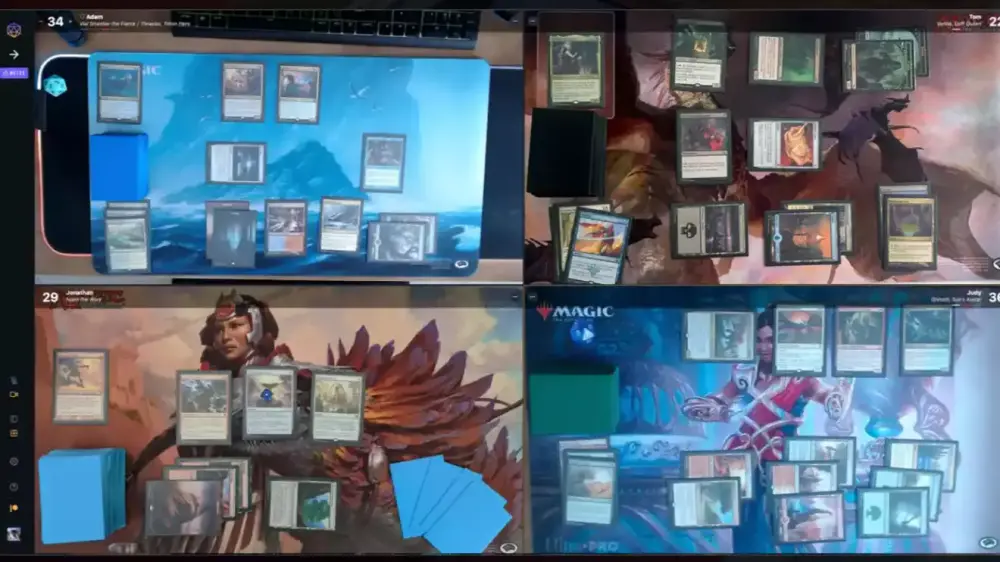
SpellTable lets you play paper Magic: The Gathering over webcam with built-in life tracking and card recognition.
The “good” setup is simple: camera straight down, solid lighting, and audio that doesn’t sound like you’re casting spells from inside a jet engine.
Card recognition is helpful, not magical. Glare, odd angles, and busy backgrounds will make it sulk.
The biggest problem isn’t tech. It’s mismatched expectations. A 60-second power level chat saves you an hour of polite suffering.
Proxies are usually fine in casual webcam games if everyone agrees and the cards are readable. Don’t be weird about it.
You already own the cards. You already know the rules. And yet, playing remotely can still feel like you’re trying to assemble IKEA furniture in the dark while three strangers argue about what “casual” means.
SpellTable MTG games are the compromise we all ended up with: real cardboard, real shuffling, real Commander politics, and a camera pointed at your playmat like it owes you money. The good news is you don’t need a streaming studio. The bad news is you do need to point the camera at the cards.
What SpellTable is (and what it isn’t)
SpellTable is a browser-based way to play paper Magic with other humans online. You set up a webcam (or phone camera) over your battlefield, join a game lobby, and play like you would at a table, just with more “can you tilt that a bit?” than anyone asked for.
The standout feature is card recognition. If someone drops something with tiny text, you can click the card in their video feed and pull up a readable version on your screen. That alone turns “squinting at blurry rectangles” into “actually making informed decisions,” which is a nice change of pace.
It also handles a lot of the annoying bookkeeping that normally ends up on a pile of dice and half-forgotten life pads: life totals, commander damage, infect, and other common tracking. So you can spend more time playing and less time negotiating whether someone is at 28 or 23 because their phone camera briefly became modern art.
What SpellTable is not: a rules engine. It won’t stop illegal plays. It won’t prevent missed triggers. It won’t protect you from the guy who says “it’s a chill deck” and then presents a turn-three deterministic line like it’s a party trick. That part is still on you.
Getting set up without turning your kitchen into a film studio
You can absolutely overthink your setup. Many people do. It’s a proud tradition.
In reality, you need three things to feel “normal” to other players:
A camera straight down on your play area.
Top-down matters more than resolution. A slightly grainy top-down view beats a crisp angle shot where half your battlefield is foreshortened into a Picasso painting.
Lighting that makes text readable.
If your cards look like they’re being interrogated under a single bare bulb, recognition will struggle and opponents will get cranky. Aim for bright, even light. Avoid harsh glare reflecting off sleeves.
Audio that doesn’t punish the table.
If your microphone picks up every exhale, keyboard click, and chair creak, people will quietly regret their life choices. A basic headset mic is often cleaner than laptop audio, and it reduces echo.
If you want the simplest “good enough” rule: set up your camera, put a card down, and ask yourself, “Could a stranger read this without guessing?” If the answer is no, fix lighting and angle before you fix anything else.
Making the tech behave: card recognition, glare, and the usual suspects
SpellTable’s card ID feels great when it works and mildly insulting when it doesn’t. Most recognition issues come down to a few repeat offenders:
1) Camera angle is off.
Recognition likes straight-down views. If your camera is tilted, the card looks warped and the system gets less confident.
2) Glare on sleeves.
Overhead lights reflecting off glossy sleeves can wash out the art and name line. Move the light source, diffuse it, or shift your camera height until the glare disappears. Matte sleeves can help, but you don’t need to buy new sleeves just to play a webcam game. Try repositioning first.
3) Background contrast is too busy.
A solid, darker playmat makes the cards stand out. If your battlefield is sitting on a floral tablecloth that looks like it belongs in a Victorian mystery novel, recognition will occasionally panic.
4) Your “proxies” are a full art fever dream.
Custom art and alternate frames are awesome for personal style and terrible for consistent recognition. The fix is simple: make sure the name is clear, and be ready to manually search the card if the click-ID doesn’t find it quickly.
Also, don’t treat card recognition like it’s required for gameplay. It’s a convenience feature. If it’s misfiring, fall back to normal human communication: say the card name, explain what it does, and keep the game moving.
One more practical tip: if your browser keeps fighting your camera and mic permissions, switch browsers. Many players report the smoothest results using a mainstream Chromium-based browser.
The real game is social: lobbies, power levels, and expectations
Most SpellTable frustration isn’t because the platform is bad. It’s because you sat down at a table where everyone had a different mental definition of “casual.”
Remote play amplifies this. In person, you can read vibe faster. Online, a lobby title like “mid power chill” can mean anything from “precon with two swaps” to “I removed the fast mana, but I kept the infinite combo because it’s ‘fun.’”
You’ll have a better time if you treat power-level chat like shuffling: basic courtesy, not a dramatic negotiation.
Here’s a quick framework that actually works:
A) State your deck speed, not your deck identity.
Instead of “this is a 7,” try:
“This wins through combat most games.”
“This can combo, but it’s not fast.”
“This is tuned and can end games quickly if unanswered.”
B) Mention the kinds of cards that create surprises.
Fast mana, free interaction, mass land destruction, stax, and infinite combos are the classics. You don’t need a full deck tech. Just warn people about the stuff that changes expectations.
C) Confirm proxy comfort level early.
Most casual tables don’t care if your deck includes proxies, they care if your deck includes surprises. If you’re using playtest cards, keep them readable and be upfront. That’s it. You’re not confessing to a crime. You’re sharing information so everyone can have a decent game.
If you want more structured matchmaking, many players use Discord communities that run organized queues and power tiers. PlayEDH is one well-known example, and there are plenty of smaller servers built around specific vibes (budget, cEDH, precons, theme decks, “no salt,” etc.). The point isn’t the brand name. The point is playing with people who agreed on the rules before the first land drop.
Quick scripts that prevent 80% of problems
You don’t need to become a customer service rep. You just need one or two lines ready so you don’t freeze up on camera like you’re about to present a quarterly report.
Power level opener (15 seconds):
“Hey all, quick check: this is a mid-power deck, mostly combat, no fast combo. Anyone playing something significantly faster or slower?”
Proxy transparency (10 seconds):
“Small heads up: I’m running some playtest cards. Everything’s readable in sleeves. If you want me to call out card names more clearly, just say so.”
If the table is a mismatch (polite exit):
“Appreciate it, but I don’t think my deck fits this pod. I’m going to bow out so you can fill the seat with someone on the same speed. Good luck, have fun.”
If someone gets spicy:
“Let’s keep it chill. If we can’t, I’m going to leave and find another pod.”
That’s the whole trick. Clear expectations, clean exits, no drama. You’re here to cast spells, not to win an argument about what “fair” means.
FAQs
Is SpellTable free?
Yes. SpellTable is generally presented as a free web app for playing paper Magic online.
Do I need a Wizards account?
In most cases, yes. SpellTable uses a Wizards login for access.
Can I use my phone as the camera?
Yes. Many people use a phone as the overhead camera, often mounted on a simple arm or stand.
Does SpellTable work with MTG proxies?
In casual games, it usually comes down to table consent. If your pod is fine with proxies and they’re readable, you’re probably fine. In sanctioned play, assume authentic cards are required unless an organizer explicitly says otherwise.
What’s the best way to avoid power-level mismatch?
Play with people you know, join a curated Discord community, or spend one minute doing a real pregame chat. The “skip the conversation and hope” strategy has a surprisingly low win rate.